

The most useful AI tool isn’t necessarily the one with the most features. AI tools can help create content, analyze information, answer questions, or handle parts of a task. An AI tools directory organizes them by category and use case, making it easier to find options that fit your goal. The right choice depends on what you need the tool to do.
With so many tools designed for different purposes, it can be hard to identify relevant options and compare them. This guide explains what AI tools do and how to discover, compare, and choose them for business, marketing, productivity, and other needs. You’ll find common categories, examples of tasks tools can support, and practical criteria for narrowing your search.
Key Takeaways
- Start with the task you need to complete, then explore the categories and use cases that match it.
- Compare tools by their capabilities, pricing, alternatives, and fit for your workflow rather than by feature count alone.
- Use directories to narrow your search, but treat listings as a starting point and assess whether each option suits your needs.
- For business, marketing, and productivity tasks, define the outcome you want before choosing a tool.
- Use search and comparison features to sort options more efficiently and focus on the details that affect your decision.
AI tools grouped by category and use case
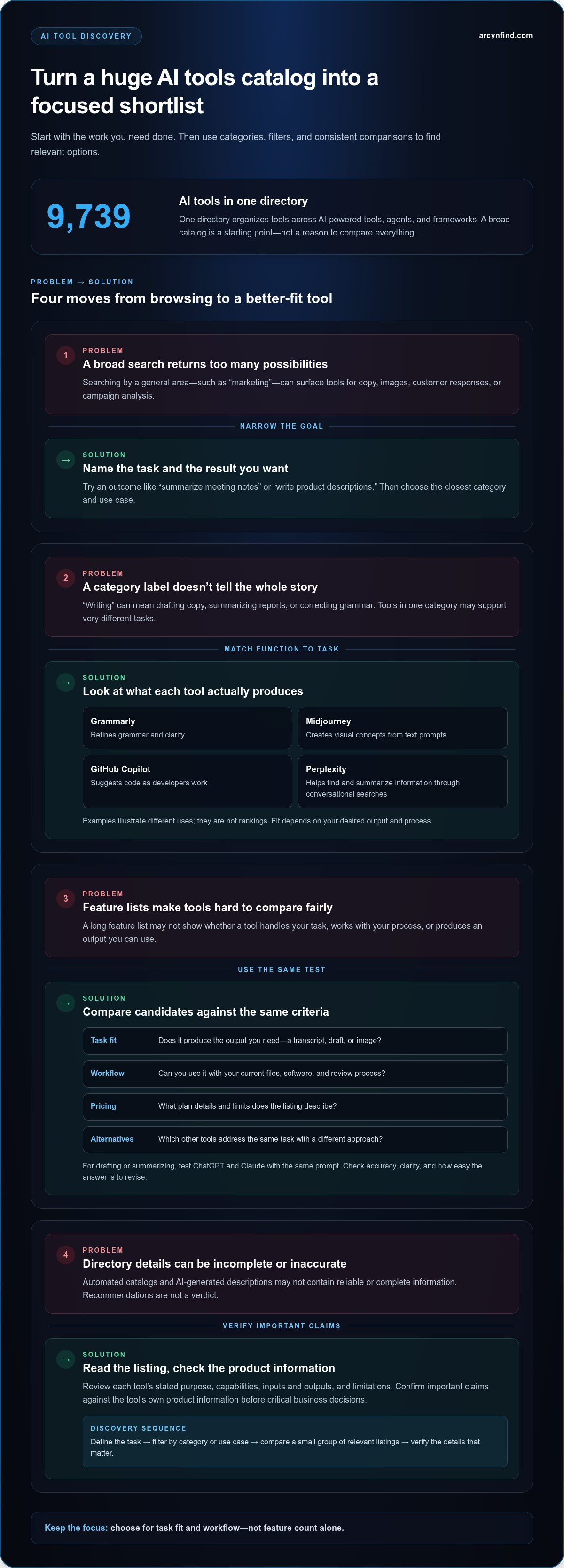
An AI tools directory groups software by the work it supports, making a broad search more practical. One directory lists 9,739 AI tools, organized across AI-powered tools, agents, and frameworks. Categories can cover writing, image creation, research, coding, customer support, and workflow automation. Start with your task, then use a matching category to find relevant options.
Categories describe a tool’s main function; use cases make the choice more specific. “Writing” might include drafting marketing copy, summarizing reports, or correcting grammar. ChatGPT can help with drafting and questions, Midjourney creates images from prompts, and GitHub Copilot assists with coding. These are examples, not rankings. The best fit depends on the output you need and how the tool fits your process.
- Writing and editing: Grammarly helps refine grammar and clarity; ChatGPT can generate or revise drafts.
- Image generation: Midjourney creates visual concepts from text prompts.
- Coding: GitHub Copilot can suggest code as developers work.
- Automation: Zapier connects software workflows, while AI features can help handle steps between apps.
- Research: Perplexity can help find and summarize information through conversational searches.
These examples show why a category label alone isn’t enough. Check what an AI tool produces, which models it uses when that information is available, and whether it supports your intended workflow. A “marketing” filter might include tools for copy, images, customer responses, or campaign analysis. Narrow the results by task before comparing individual listings.
How often do AI tools directories update their listings? It varies by directory. Some state that listings are refreshed continuously through automated processes, so details can change as entries are updated.
Are there AI tools directories focused on specific industries or use cases? Yes. Some organize tools around a field or task, such as education, healthcare, marketing, or software development. A focused directory can simplify a narrow search, while a broader one offers more categories in one place.
Use filters to turn a large catalog into a manageable shortlist. Start with a task such as “summarize documents,” then narrow by output type, platform, or pricing information when those filters are available. Read each listing for its stated purpose and limitations. Automated catalogues can contain inaccurate or incomplete information, so research important claims before making business decisions.
- Define: Write down the task and desired result.
- Filter: Choose the closest category and use case.
- Compare: Review a small group of relevant listings side by side.
AI tool comparisons, reviews, and recommendations
Start a comparison with the task, not a directory’s recommendation label. For example, compare ChatGPT and Claude for drafting or summarizing by testing each with the same prompt. Note whether the answer is accurate, clear, and easy to revise. For image work, compare Midjourney with another image generator using the same brief and output requirements.
How do AI tools directories compare by number of listings and categories? They vary in both listing volume and category structure. A larger catalogue may offer broader discovery, while a smaller, more curated directory may make specific applications easier to browse.
Compare listings using the same practical criteria: stated use case, core capabilities, supported inputs and outputs, and pricing details. Then consider whether the tool fits your workflow. An AI agent that handles a sequence of steps serves a different purpose from an application that answers one prompt at a time.
- Task fit: Does the tool produce the output you need, such as a transcript, draft, or image?
- Workflow: Can you use it with your current files, software, and review process?
- Pricing: What plan details and limits does the listing describe?
- Alternatives: Which tools address the same task with a different approach?
Reviews add useful context when they describe a real task. A Grammarly review might explain how it handles editing, while a GitHub Copilot review could focus on code suggestions during development. Distinguish first-hand observations from general claims. Look for details about the task, the result, and any limitations the reviewer encountered.
Browse more efficiently by narrowing your search in stages. Search for an outcome such as “summarize meeting notes,” select a related category, then compare a few relevant listings. Searching “write product descriptions” will surface different applications from a broad search for “marketing.” Save a shortlist and revisit each entry’s capabilities before choosing.
Directories with multilingual support can help readers browse in different languages. Some use Hugo’s internationalization features to provide content in multiple languages. Language support can make categories and descriptions easier to read, but the tool’s interface and generated output may still use other languages. Check which languages matter for your task.
Recommendations work best as a starting point, not a verdict. Automated listings and AI-generated descriptions can be inaccurate or incomplete, so compare claims against the tool’s own product information before critical business decisions. For a structured shortlist, compare AI tools by capabilities and alternatives alongside reviews and use-case descriptions.
Directories for discovering and submitting AI products
In 2026, the best directory depends on your goal: finding software, comparing options, or promoting a product. An AI tools directory can organize listings by task, category, and audience. Compare how each platform presents product details, organizes its categories, and handles updates. A broad catalogue may help you explore unfamiliar areas, while a focused directory can make a specific search easier.
For business and professional use, choose an AI tools directory with categories that match the work at hand. Look for useful descriptions of applications for writing, document analysis, image creation, or automation. Then assess whether each listing explains the product’s intended users and practical function. Clear details help you decide whether a tool belongs on your shortlist.
Which AI tools directories are free to use? Many platforms like Arcyn Find are free to browse and use. That means readers can explore curated listings without a browsing charge. It doesn’t mean every listed application has a free plan, so review each software product’s terms separately.
Do directories charge for featured listings or submissions? Terms vary by platform. Some may charge for featured placement or product submissions, while others use different listing policies. Read the platform’s terms to understand whether placement is paid, editorial, or open to submissions before planning a launch.
Submitting a tool can help potential users understand what a product does. A strong listing identifies the product, its main task, intended audience, and useful capabilities. For example, a writing application might draft or edit text, while an image tool creates visuals from prompts. Specific descriptions help readers distinguish these products from general chat applications such as ChatGPT.
Before submitting to an AI tools directory, prepare a concise product description and choose the closest category. Include the official product name, intended use, supported formats, and product page. Avoid broad claims such as “does everything.” A clear example, such as summarizing meeting documents or generating marketing images, gives readers a practical sense of the application.
Not every platform accepts manual contributions. Some curation platforms, including Arcyn Find, rely on automated web crawlers or strict editorial standards rather than open manual submissions for tool listings. Developers should always check a platform’s stated guidelines to understand how new products are added.
Automated updates can refresh listings, but automated content may be inaccurate or incomplete. Treat an AI tools directory as a discovery aid, then compare important claims with the product’s own information. This matters before relying on software for customer documents, internal writing, or image production.
What are the best AI tools directories in 2026? The best fit depends on your goal. Choose a platform with relevant categories, useful listing details, and terms that suit your needs. Businesses and professionals should prioritize clear use-case information over a prominent placement.
Product teams can also learn from how directories describe tools. A concise listing states the problem, explains the product’s function, and sets practical expectations. That makes it easier for readers to understand where an application fits among similar products.
There is no single best AI tools directory for everyone. Choose one based on whether you want to find software, compare options, or promote a product. Compare its product details, categories, and update practices to make the most of your research.
AI tools for business, marketing, and productivity
Choose a tool based on the business task it supports, not its label alone. A marketing team might need campaign drafts, customer research, or video edits. An operations team may want to organize documents or automate routine steps. Name the intended output first to make it easier to compare tools and assess whether their results fit your workflow.
Marketing and advertising applications cover different parts of the work. Jasper can help draft marketing copy, Canva supports visual design, and Adobe Firefly generates images from prompts. Descript can edit audio and video through text-based features. These tools serve distinct needs, so a content team could shortlist them by deliverable: copy, graphics, or video.
- Marketing copy: Jasper can assist with drafting campaign text and product descriptions.
- Visual assets: Canva supports design work, while Adobe Firefly generates images from text prompts.
- Video editing: Descript offers tools for editing audio and video content.
- Research and drafting: Claude can help organize supplied material and produce written drafts.
- Workflow automation: Zapier connects actions across supported applications to reduce repeated manual steps.
Business use also includes analysis and information handling. For example, a team can use Claude to summarize project documents, then check the summary against the source files. This can help organize material, but staff should remain responsible for decisions and verify important details before acting on generated output.
For marketing intelligence, define the question before selecting a tool. A team researching customer feedback might need an application that groups comments by theme. A campaign planner may need help turning approved messages into drafts for different channels. Clear inputs, such as a product brief and audience description, give tools relevant context without asking them to invent a strategy.
Compare applications using the same sample task. Give each writing tool the same product description, then assess accuracy, tone, and editing effort. For video tools, test the same clip and evaluate captions, cuts, and the final file. Record which step each tool handles, what review it needs, and whether it fits your existing software.
Task boundaries matter. A tool that generates images doesn’t automatically validate brand claims, and an assistant that summarizes documents may miss context. Keep a human review step for customer-facing copy, financial material, and decisions based on source information. This clarifies the tool’s role: it assists with production or organization, while people approve the result.
Search and discovery features for AI tools
Start a focused search with the task you want to complete. Instead of typing “artificial intelligence,” try “extract action items from meeting notes” or “generate product images.” Specific phrases help distinguish an everyday writing assistant from developer software or an AI agent that handles multiple steps.
Search by output, input, or workflow. A developer looking to test models might search “model playground,” while a marketer could search “turn product photos into ads.” If the first query returns broad results, add a constraint such as “for documents” or “without code.” Each phrase helps narrow the intended use.
Directory filters can make searches more precise. Where available, combine a use-case category with platform, task, or tool-type filters. For example, select “coding” and “AI agents” to focus on software that assists with multi-step development tasks. Read the listing descriptions after filtering, since category labels may group tools with different functions.
- Search by action: Try “summarize PDFs” instead of “document AI.”
- Search by output: Use “create short videos” to find video-focused applications.
- Filter by role: Choose “developer” or “marketing” when those categories are available.
- Refine by constraint: Add “open source,” “custom workflows,” or a target platform when relevant.
Named platforms can help clarify what kind of tool you need. OpenAI Playground lets developers experiment with model inputs and outputs. Hugging Face Spaces hosts interactive demonstrations of machine-learning applications. These serve different discovery needs: one supports model experimentation, while the other helps people explore working demos.
Search terms shape the results. A query for “write a newsletter” may surface drafting applications, while “plan newsletter topics” points toward research or ideation tools. Try another phrasing when results miss the task. Search “transcribe interviews” as well as “speech to text” to find listings that use different wording.
Before opening a listing, scan its title, category, and short description. Then compare its stated function with your original task. If a “custom assistant” listing focuses on chat, it may not suit a workflow requiring file processing or automation. Match the description to the actual work to keep irrelevant tools off your shortlist.
Search results are a starting point, not a complete measure of fit. Directory entries may be generated or refreshed through automated processes, and their descriptions can be incomplete. OpenAI Playground, for example, is useful for exploring model behavior, but a directory summary alone won’t show how a particular setup handles your data. Review product details before adopting a tool for sensitive work.
Use a simple loop: search with an action phrase, apply relevant filters, inspect a few listings, and refine the query. Searching “organize research notes,” then adding a document-related filter, gives you a clearer route than browsing broad artificial-intelligence labels.
Arcyn Find: AI tools discovery directory
Arcyn Find helps you discover AI software and compare tools when a broad search leaves too many options to sort through. Its AI tools discovery directory organizes options by task, while its comparison features help you assess capabilities, pricing, and alternatives. Build a shortlist in the directory, then compare tools against your task, workflow, and budget.
Arcyn Find also publishes software reviews, practical guides, and industry insights. These publications can help you understand what a tool is designed to do before deciding whether it fits your needs. The directory and comparison features are useful starting points, but review the product details that matter to your work.
Explore Arcyn Find to discover and compare AI tools, or contact Arcyn Find with your questions.
Choose a tool with a clear next step
Turn your shortlist into a practical test. Choose one task, define what a useful result looks like, and try the same input across your leading options. Note output quality, editing effort, and fit with your workflow. An AI tools directory can help you find candidates, but testing your own task gives you a useful basis for choosing.
Arcyn Find offers an AI tools discovery directory, AI tool comparisons, and AI tools publications. Use the directory to explore options, comparisons to review capabilities and alternatives, and publications to learn about tools in context. An AI tools directory is most useful when you apply clear criteria to the results. Keep your shortlist focused on the work you need done, and use the directory to continue exploring relevant options.
Contact Arcyn Find to discuss your needs and take your next step at your own pace.
Frequently Asked Questions
What are AI tools?
AI tools use artificial intelligence to assist with tasks such as drafting, image creation, transcription, or data analysis. An AI tools directory can help you find applications by function. For example, a speech-to-text tool turns recorded audio into written text, while a writing assistant can suggest edits. Review the tool’s output, especially when accuracy or context matters.
What are the best AI tools right now?
The best option depends on your task and how you’ll use the result. ChatGPT and Claude can assist with writing and research, Midjourney can generate images, and GitHub Copilot can suggest code. To compare options, test them with the same realistic input. Note how much correction each result needs and whether the tool fits your existing workflow, rather than relying on rankings alone.
Where can I find the best free AI tools?
Browse a directory, then check the individual tool’s plan details before relying on it. An AI tools directory is free to browse and use, but that doesn’t mean every listed application is free. For instance, before using a writing assistant for regular work, review its access limits and features. Test the tool with a small task to see whether its available functions meet your needs.
Which AI tools are useful for business?
Business tools are useful when they address a defined task. A team might use Grammarly to edit customer-facing copy, ChatGPT to draft an internal update, or Zapier to connect routine steps between supported applications. For document work, start with a sample that contains no sensitive information. Compare the generated summary with the source and decide who will review it before it informs a business decision.
What AI tools should developers use?
Developers can try GitHub Copilot for code suggestions and Hugging Face Spaces to explore interactive machine-learning demos. Choose based on whether you need help writing code, testing a model, or seeing an application in action. Use a small task from your current project to assess relevance. Review suggested code, run appropriate tests, and check that the result follows the project’s conventions.
Which AI tools directories offer user reviews and ratings?
Directory features vary, so look for reviews that explain the task tested and the reviewer’s experience. An AI tools directory may include ratings, editorial reviews, or both, each offering different context. A score without an explanation can’t show whether a tool suits your work. Arcyn Find publishes software reviews and offers tool comparisons to help readers assess capabilities and alternatives.
How can I submit an AI tool to a directory?
Check a directory’s submission policy first, since not every platform accepts manual listings. The AI Tools Directory does not accept manual submissions. For a directory that invites entries, prepare the product name, intended audience, concise description, and a specific example of its function. For instance, explain whether a document tool extracts key points or answers questions about uploaded files.
How can I identify trustworthy AI tools in a directory?
Assess product details, not just listing claims. An AI tools directory can help you discover options, but a useful entry should identify the developer, describe the tool’s purpose, and explain relevant data practices. Try a low-risk task and compare the output with a dependable source. Before uploading private files, review how the product handles data and which permissions it requests.